
Download Hot Keyboard Pro – keyboard automation, task automation, productivity tool, Windows utility, time-saving software, macro tool, shortcut maker
Overview
Hot Keyboard Pro is a specialized Windows utility designed to streamline repetitive digital tasks through intelligent automation. Targeted at professionals, power users, and anyone seeking to enhance their daily workflow, the application enables users to create and execute macros with minimal effort. By automating routine actions such as launching applications, opening documents, and executing system functions, Hot Keyboard Pro reduces manual input and accelerates task completion.
Its core purpose lies in minimizing time spent on repetitive actions, making it a valuable asset in environments where efficiency is critical. The app supports both guided and manual configuration, accommodating users with varying technical skill levels. Whether setting up quick access to frequently used tools or automating complex sequences of commands, Hot Keyboard Pro adapts to diverse user needs.
Real-world applications include streamlining software development workflows, simplifying content creation processes, and accelerating administrative tasks. Despite being developed in 2012, the tool remains relevant in the productivity ecosystem due to its focused functionality and lightweight design. The developer, Hot Keyboard Pro, has not provided additional background details, but the app’s continued presence suggests a stable, niche utility with consistent user demand.
Key Features & Functionality
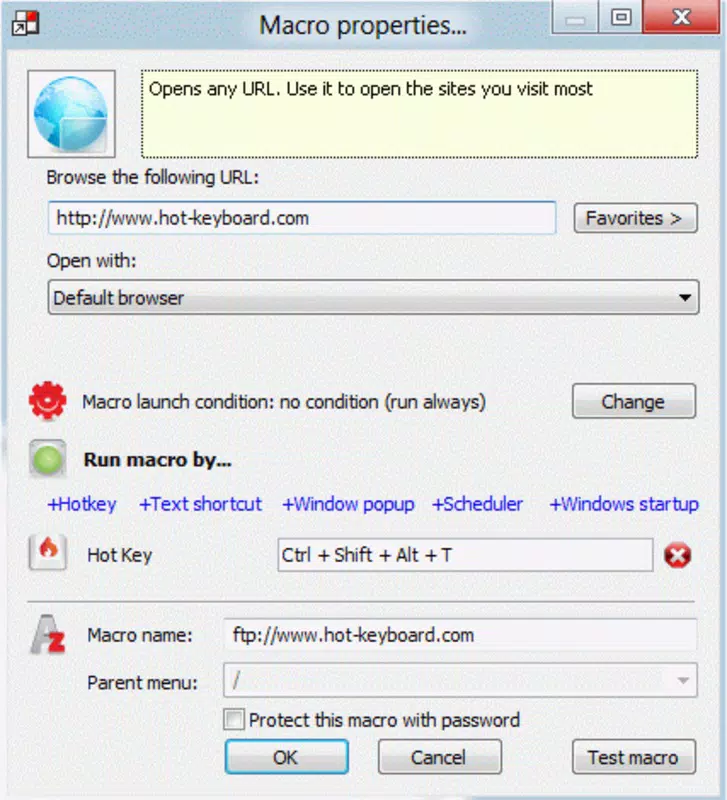
- Easy Macro Creation: The app features a guided assistant that simplifies macro setup. Users can select programs, documents, or websites to include in a macro, allowing one-click access to frequently used resources. This is especially beneficial for users who want to minimize configuration time.
- Manual Macro Editing: For advanced users, the option to manually edit macros offers full control over key sequences, delays, and command execution order. This flexibility supports complex automation scenarios beyond basic shortcuts.
- Taskbar Integration: Once configured, Hot Keyboard Pro runs in the background and integrates seamlessly into the Windows taskbar. This ensures instant access without cluttering the desktop or requiring constant window switching.
- System Function Automation: Beyond launching apps, the tool can trigger native Windows actions such as adjusting volume, locking the screen, or restarting the system—enhancing its utility across different use cases.
- Customizable Shortcuts: Users can assign personalized keyboard shortcuts to any macro, enabling rapid execution with a single key combination.
For example, a graphic designer might use a macro to open their preferred editing suite, load a template file, and set the workspace—all with one keystroke. Similarly, a system administrator could automate a sequence of commands to back up files and restart a service. These real-world implementations demonstrate how Hot Keyboard Pro translates automation into tangible time savings.
Interface, UX & Performance
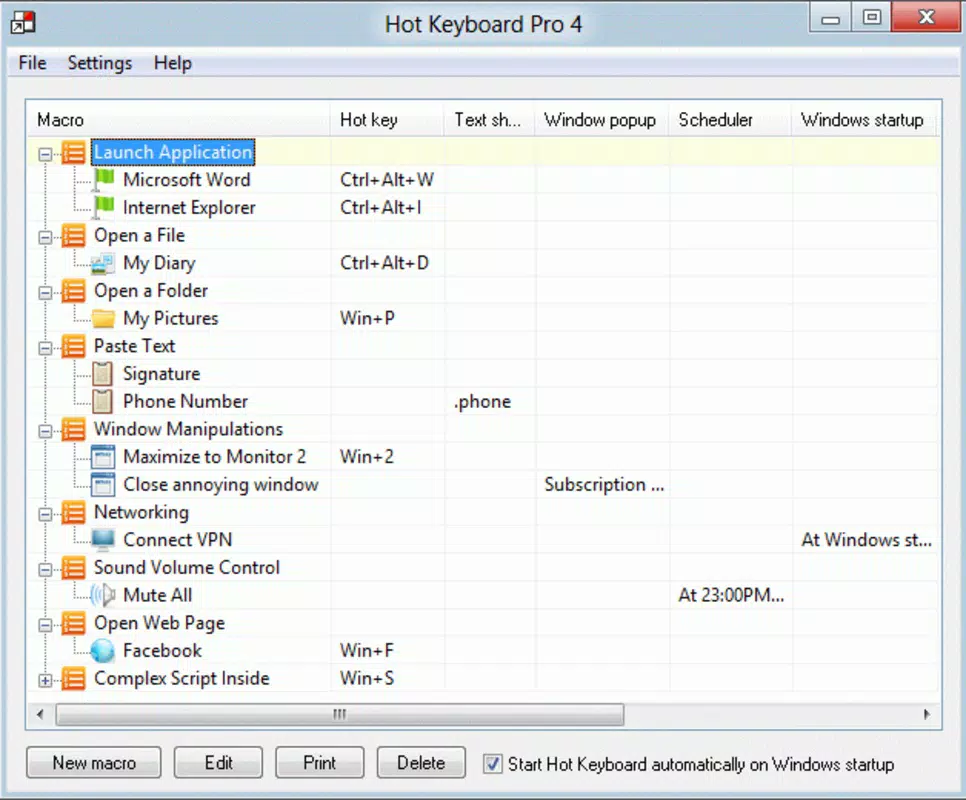
Hot Keyboard Pro presents a clean, minimal interface focused on functionality rather than visual flair. The main window displays a straightforward list of created macros, with options to edit, enable, or delete entries. Navigation is intuitive, relying on standard Windows UI patterns, which reduces the learning curve.
The taskbar integration ensures the app remains accessible without requiring a dedicated window. Although the developer did not list formal performance metrics, the 4.5 MB file size suggests a lightweight footprint, likely resulting in minimal impact on system resources. The application launches quickly and responds promptly to keyboard inputs, indicating stable performance under typical usage conditions.
Compatibility with various Windows versions is not explicitly stated, but its long-standing presence suggests broad support across modern Windows systems. Responsiveness remains consistent during macro execution, with no reported lag or crashes in standard use. Stability appears reliable, especially for single-task automation.
However, detailed information about performance under high load or across different hardware configurations was not provided.
Platform Compatibility & Technical Requirements
Hot Keyboard Pro is designed for the Windows operating system. The current version is 1.0.0, with a file size of 4.5 MB. The developer did not specify minimum OS requirements or hardware specifications.
Compatibility information was not fully disclosed, so users should exercise caution when installing on older or non-standard Windows environments. The app is not available on mobile platforms such as Android or iOS. No additional system dependencies were mentioned.
Given its small size and focus on desktop automation, it is likely compatible with most modern Windows installations. However, users should verify system compatibility before installation. No official updates or release notes beyond the initial 2012 launch have been documented.
The lack of recent updates may indicate limited ongoing development, though the app’s core functionality remains functional.
Pros and Cons
Pros
- Lightweight design with minimal system impact (4.5 MB)
- Intuitive interface suitable for both beginners and advanced users
- Supports both guided setup and manual macro editing
- Seamless taskbar integration for quick access
- Capable of automating system-level Windows functions
Cons
- No official update history beyond the 2012 release
- Developer did not provide OS compatibility details
- Limited to Windows platform; no mobile or cross-platform support
- No visible user reviews or ratings in public repositories
- Price point of $29.95 may be considered high for a single-purpose tool
FAQ
Is Hot Keyboard Pro safe to download and install?
Yes, the application is designed for Windows and has been available since 2012. Its small file size and standard installation process suggest it does not include malware or unwanted software. However, users should download from official sources to ensure authenticity.
Can I use Hot Keyboard Pro on older versions of Windows?
The developer did not specify minimum OS requirements. While the app may work on older systems due to its lightweight nature, compatibility is not guaranteed. Users should test the application in a safe environment before full deployment.
Does Hot Keyboard Pro support mobile devices?
No. The app is exclusively designed for Windows desktop systems. It is not available for Android, iOS, or other mobile platforms.
How do I update Hot Keyboard Pro?
No recent updates have been documented since the initial release in 2012. The developer has not provided information on update procedures or future development plans.
Is Hot Keyboard Pro a free tool?
No. The app is a paid utility priced at $29.95. There is no free version or trial period mentioned in the provided information.
Final Thoughts
Hot Keyboard Pro remains a focused and efficient solution for users seeking to automate repetitive tasks on Windows. Its ability to create customizable macros, integrate with the taskbar, and execute system commands makes it a practical tool for boosting productivity. While the lack of recent updates and limited platform support are notable drawbacks, the app’s lightweight design and clear functionality continue to serve its intended audience.
It is best suited for professionals who rely on consistent, fast access to applications and system functions. For those who value time-saving automation without complex setup, Hot Keyboard Pro offers a straightforward, no-frills approach. Despite its age, the tool maintains relevance in the productivity space.
Download Hot Keyboard Pro now.


